Command Reference
This page contains the complete reference for all available printer commands in the escpos2mqtt DSL. This document describes the Domain Specific Language (DSL) used to send printing commands to ESC/POS-compatible printers. The documentation below is automatically generated from the parser implementation.
Overview
The DSL consists of commands that are executed sequentially. Each command must be on its own line. Empty lines are ignored. String arguments must be enclosed in double quotes.
Text Output
write
Syntax: write "<text>"
Outputs text to the printer without a line break at the end
Examples:
write "Hello World"
write "Price: $19.99"
writeln
Syntax: writeln "<text>"
Outputs text to the printer followed by a line break
Examples:
writeln "Hello World"
writeln "Order #12345"
Text Formatting
bold
Syntax: bold <true|false>
Enables or disables bold text
Examples:
bold true
bold false
underline
Syntax: underline <none|single|double>
Sets the underline mode for text
Examples:
underline none
underline single
underline double
double_strike
Syntax: double_strike <true|false>
Enables or disables double-strike for text
Examples:
double_strike true
double_strike false
font
Syntax: font <a|b|c>
Sets the font type. Available fonts depend on printer model and might fallback to another font if unavailable.
Examples:
font a
font b
font c
flip
Syntax: flip <true|false>
Flips text 180 degrees
Examples:
flip true
flip false
reverse
Syntax: reverse <true|false>
Enables or disables inverted text colors (white text on black background)
Examples:
reverse true
reverse false
size
Syntax: size <width>,<height>
Sets character size multiplier (1-8 for both width and height)
Examples:
size 1,1
size 2,2
size 3,1
reset_size
Syntax: reset_size
Resets text size to default (1,1)
Examples:
reset_size
Layout & Spacing
justify
Syntax: justify <left|center|right>
Sets text justification/alignment
Examples:
justify left
justify center
justify right
feed
Syntax: feed <lines>
Feeds paper forward by the specified number of lines
Examples:
feed 1
feed 3
feed 10
feed
Syntax: feed
Feeds paper forward by 1 line (default)
Examples:
feed
Barcodes & QR Codes
ean13
Syntax: ean13 <12-13 digits>
Prints an EAN-13 barcode (12 or 13 digits)
Examples:
ean13 1234567890123
ean13 123456789012
ean8
Syntax: ean8 <7-8 digits>
Prints an EAN-8 barcode (7 or 8 digits)
Examples:
ean8 12345678
ean8 1234567
qr_code
Syntax: qr_code "<data>"
Prints a QR code with the specified data
Examples:
qr_code "https://example.com"
qr_code "Hello World"
Special Commands
sudoku
Syntax: sudoku
Generates and prints a random Sudoku puzzle
Examples:
sudoku
minicrossword
Syntax: minicrossword
Generates and prints a mini crossword puzzle
Examples:
minicrossword
cut
Syntax: cut
Cuts the paper (if printer has auto-cutter)
Examples:
cut
todo
Syntax: todo "<task>"
Adds a line rendered as a todo item
Examples:
todo "Buy groceries"
todo "Call dentist"
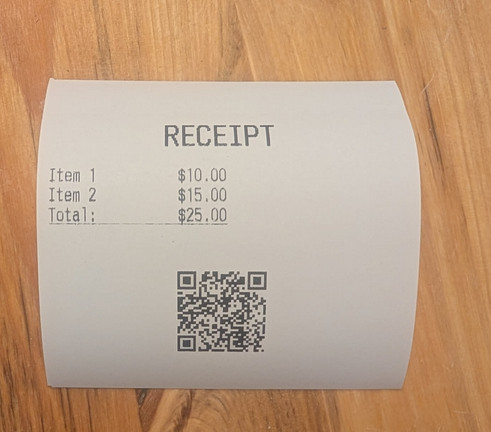
Complete Example
justify center
bold true
size 2,2
writeln "RECEIPT"
reset_size
bold false
feed 1
justify left
writeln "Item 1          $10.00"
writeln "Item 2          $15.00"
underline single
writeln "Total:          $25.00"
underline none
feed 2
justify center
qr_code "https://example.com/receipt/12345"
feed 2
cut